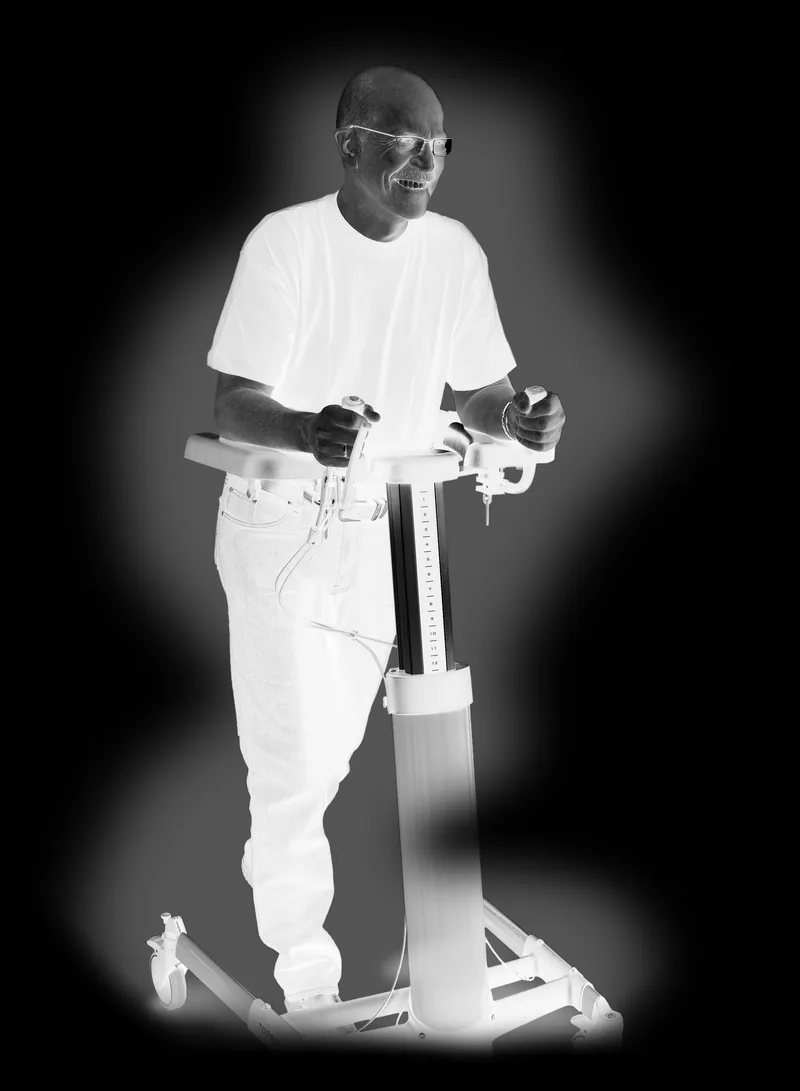

Welcome as a user of a TOPRO PRODUCT Every TOPRO product is developed, designed and made in Norway. Advanced manufacturing equipment, quality and environmental security give great accuracy and maximum quality in all levels of production. The product is declared to be in conformity with the Medical Device Directive 93/42/EEC. It is tested and approved according to EN ISO 11199-3:2005. On receipt of the goods, please check your product. If you have any quires please contact your mobility shop or dealer immediately. The same applies if you have general questions about the product. If you have problems read- ing this user manual, an electronic version is available on www.topro.co.uk
Warranty // Expected life span of the product TOPRO TAURUS is guaranteed free for faults and defects for 2 years. Damage caused by incorrect use or parts that are exposed to natural wear and tear (such as e.g. battery, brakes, wheels and handles) are exempt from the 2-year warranty. For repairs in the warranty period, please refer to your local mobility shop or dealer. The warranty is void if unauthorised spare parts and accessories have been or are being used on the product. The expected life span of the product is estimated to be 10 years, provided that it is used in the correct manner ac- cording to this user manual and its safety and maintenance instructions.
The red numbered squares below refer to the numbered illustrations on the inside of the cover.
TOPRO TAURUS E Basic needs assembling. TOPRO TAURUS E Premium is delivered completely assembled. Adjust the forearm supports and handles, see figure 5 and 6. The battery must be charged, see figure 9.
A The label on the rear side of the column shows the product name/model and Maximum weight of user Maximum width of walker Maximum height of walker A separate label on the column indicates the serial number (SN) and production year and month.
TOPRO TAURUS E is delivered with two levels of equipment Basic (814790) Adjustable arm pads and brakes on all wheels. Delivered partly assembled. Premium (814789) In addition to adjustable arm pads and brakes on all wheels it has adjustable handles and
a driving and parking brake on the handle. The rear wheels have a lock for swing (directional block). Delivered completely assembled.

Intention The TOPRO TAURUS is a walker, which shall give support to users with reduced balance and/or reduced walking ability. The model TOPRO TAURUS E Premium might also serve as raising support. The intended user is an adult. The walker is developed for pushing, not pulling. The main user of the product is the patient him-/herself; however, the walker can also be operated by an assistant. The walker is not suitable for persons with low strength in arms and legs, with very poor balance, or with considerable cognitive disabilities. The product is designed and approved for indoor use on plain foundation. We advise caution when using the TOPRO TAURUS in private homes with narrow doorways, as the maximum width of the walker is 660 mm.
Press the button A on top of the handle to the left or to the right to regulate the height.
The forearm supports are adjusted individually. Unscrew the lock underneath the forearm support A until the cush- ion is moveable. Place at the required position and tighten the screw. NB If the lever sticks out, it can be dangerous. Pull it down and rotate it away to be hidden.
Unscrew the screw A until you can move the handle. Adjust the handle B to the required angle, length and twist and tighten the screw. NB The screw must not be screwed too far out as the parts will fall from each other. If this happens, then put the pin C in the hole D and E. It is not possible to pull the handles all the way out; there are physi- cal stops both ways. See figure 1 for more detailed instructions.
Adjusting/controlling the brakes: Unscrew the nut A. Tighten / loosen the brake wire with the adjusting screw B. Ensure that the brakes are working properly and only touching the wheels when in use. Adjust the brakes evenly on both sides. Important information: Ensure that the brakes work properly before each trip. Inspect the brakes frequently by following the information above. The walker wheels are made of a soft rubber, which gives an optimal braking capacity on slippery floor. Wrong use can cause unsafe situations and damage to the walker: The walker must not be driven or pushed with force when the parking brakes are on or when the wheels are partly locked using the brakes. This indicates incorrect use and can cause wear and tear, which makes the tires and brake quality weaker. Using the parking brakes: The brake lever C works on both rear wheels simultaneously. Push the brake lever forward. It has some resistance before it stops and locks both the rear wheels. Pull the brake lever backwards to release the rear wheels. Inspect the brakes frequently to make sure they work properly. Using the driving brakes: The brake lever D works on both rear wheels simultaneously. Pull the brake lever towards you to stop the rear

wheels. When the brake lever is released, the rear wheels are released. Inspect the brakes frequently by following the information above.
Step on the foot brakes A on the rear wheels or when required on all wheels until you hear a clicking sound. The wheels are now in a locked position B. To release the wheels, step on the back of the foot brake pedal so that it comes up again.
It is important to charge the battery on a regular basis to prolong the battery life. We recommend charging the battery every 24 hours. Regular charging will improve the performance of the battery. Please note: If the walker is not used over a long period of time, then the battery should be taken out and placed in the charger otherwise it will lose power and efficiency. It takes approximately 5–8 hours to fully charge the battery. Charging: Connect the charger to the power grid without the battery. A yellow light will shine and a green light will flash. Hold the battery, turn it 45 degrees and lift it out of the control box of the walker A. Please check that the con- tact surfaces are clean. Put the battery in the battery charger; check that one of the arrows on the battery B points towards the white and blue mark/eye C. A green light will flash during charging. The light will show a constant green colour when the battery is fully loaded. To mount the battery on the walker again put the battery back in the control box on the column. Check that one arrow points towards the white and blue mark/eye and the other arrow points straight back D. Be aware: When the battery level is very low, it might only be possible to adjust the height of the walker down, not up. The battery has to be reset if this occurs. Take the battery out of the control box and press the red height adjustment button on the handle (see illustration 4) until you hear a beep.
Different beep signals: Short “beep-beep” from the control box every 24th second = low battery level. Charge the battery. Long “beeeeep” when the battery is put in the control box = good connection Short “beep-beep” when the walker is being raised and lowered = low voltage. The battery should be replaced. If recharged, the battery will still give power but only for a limited time. Long “beeeeep” when the Taurus is being raised and lowered = battery voltage lower than 17.6 V. It will only be possible to lower it, not raise it. Short “beep-beep-beep-beep”= too high temperature inside the control box. Stop using until the control box has cooled down.
To be done with an index pin A on both wheels. Make sure the mounting bracket for the foot brake is pointing backwards. This is how the index pin works: Locking: Twist the upper part of the index pin B so that it fits into the track of the lower part C. By doing this the pin D will slide out and lock. Releasing: Pull the upper part of the index pin B up and turn it 90 degrees. NB: Make sure it stays in the upper track. It will then lock in the upper position. The pin D slides in and the index pin is unlocked. Please note: If there is no need to lock the swing but there is a risk that the user may unintentionally release the index pin, we recommend removing it. This is done by screwing it out with an adjustable spanner.
Transport The walker can be transported either in vertical or horizontal position. The walker should be set in the lowest height position, to save space and ease the handling. Ensure that the foot brakes are on. Be careful when loading the walk- er into a vehicle, giving attention to securing of the item.
Storage The walker should be stored indoors and in an upright position.
Material // Recycling The walker is made of plastic coated aluminium pipe, plastic couplings and material of plastic and polyester. The forearm cushions are of polyurethane. Most parts can be recycled. Dispose the walker according to the applicable regulations in your country. For information, please contact your public authorities. The battery contains NiMH (nickel). Do not dispose the battery in ordinary household waste, some communities offer recycling or collection of batteries.

Cleaning The walker can be cleaned with normal household detergents. Do not use scrub detergents, steam- or high-pres- sure cleaners. The walker cannot be hosed because of the electric motor.
Disinfection Disinfection must only be carried out by authorized personnel and by wearing sufficient protective equipment. The surface must be cleaned with at disinfection that contains 70–80 % ethanol. We advise against disinfection contain- ing chlorine and phenol. The manufacturer cannot be held responsible for any damage or wounds that might occur by the use of harmful disinfection or disinfection carried out by unauthorized personnel.
Inspection // Maintenance // Re-use The wheel bearings are sealed and maintenance-free. The other parts do not need to be lubricated. It is recom- mended that general inspection and maintenance is carried out and that the items below are checked on a regular basis, and at least once a year (how frequent is determined by how and how often the walker is used): Tubes, frame and screws, cables, handles and forearm supports, brakes, wheels and accessories. This also applies when the walk- er is to be prepared for re-use. Please see detailed instructions in this user manual about maintenance of the brakes and cleaning and disinfection of the walker.
If the product does not work properly 1 = Possible reason 2 = Action
Brakes 1 Worn out / defect wheel 2 Change the complete wheel 1 Not braking effectively 2 Adjust the brake wire 1 Worn out / defect brake mechanism on wheel 2 Change the entire back wheel section 1 Worn out / defect brake handle 2 Change the complete brake handle 1 Worn out / damaged brake wire 2 Change the brake wire
Height adjustment 1 Battery is flat/does not work 2 Charge or change the battery. See point 9; charging the battery 1 The height adjustment does not work 2 See point 9; charging the battery It only goes down, not up 1 The battery is not correctly mounted 2 Check that the battery is clean and correctly mounted 1 Loose cable contact 2 Check that all contacts are properly in place and tightly fitted 1 Damage on the cable 2 Check all cables and replace any damaged one(s) 1 Defect switch 2 Change the switch 1 Defect height adjusting panel (accessory) 2 Change the height adjusting panel
In the event that all of the above has been checked and the product is still not operating correctly, then the cause may be damage to the control box or actuator. Please contact your supplier.
Accessories For pictures and TOPRO article numbers please see the inside of the cover. Accessories mounted on the walker may influence stability, we therefore advise you to use them carefully. A Height adjustment panel B Forearm side support (pair) C Brake handle left side
F Stand for body fluid-boxes G Small basket H Holder for oxygen I Footplate J Infusion stand K Wall mount for battery charger
(instead of right, only for the Premium model) D Adjustable handles (to upgrade the Basic model) E Table
The accessories are to be ordered separately to give the possibility to compose a TOPRO TAURUS that suits the indi- vidual users need. Contact your mobility shop, dealer or TOPRO for an updated overview of the accessories, or visit our homepage www.topro.co.uk
In case of questions or product faults, please contact your mobility shop or dealer.

Working ambient temperature for controller and battery charger: 0 °C to +40 °C
Delivery and storing ambient temperature for actuator, controller and battery charger: −20 °C to +50 °C
Guidance and manufacturer’s declaration Electromagnetic EMISSIONS for all ME EQUIPMENT and ME SYSTEMS
The TOPRO TAURUS walking aid is intended for use in the electromagnetic environment specified below. The customer or the user of the TOPRO TAURUS walking aid should assure that it is used in such an environment. Emissions test Compliance Electromagnetic environment – guidance RF emissions CISPR 11
Group 1 The TOPRO TAURUS walking aid uses RF energy only for its internal function. Therefore, its RF emissions are very low and are not likely to cause any interference in nearby electronic equipment. RF emissions CISPR 11
Class B The TOPRO TAURUS walking aid is suitable for use in all establishments, including domestic establishments and those directly connected to the public low voltage power supply network that supplies buildings used for domestic purposes.
Harmonic emissions IEC 61000-3-2
Voltage fluctuations/ flicker emissions IEC 61000-3-3
Guidance and manufacturer’s declaration Electromagnetic IMMUNITY for all ME EQUIPMENT and ME SYSTEMS
The TOPRO TAURUS is intended for use in the electromagnetic environment specified below. The customer or the user of the TOPRO TAURUS should assure that it is used in such an environment. IMMUNITY test IEC 60601 test level Compliance level Electromagnetic environment – guidance Electrostatic discharge (ESD) IEC 61000-4-2
Floors should be wood, concrete or ceramic tile. If floors are covered with synthetic material, the relati- ve humidity should be at least 30 %. Electrical fast transient/burst IEC 61000-4-4
± 6 kV contact ± 8 kV air
± 2 kV for power supply lines ± 1 kV for input/output lines
Main power quality should be that of a typical commercial or hospital environment.
± 1 kV line(s) to line(s) ± 2 kV line(s) to earth
Main power quality should be that of a typical commercial or hospital environment.
Voltage dips, short interruptions and voltage variations on power supply input lines IEC 61000-4-11
95 % dip in UT) for 0,5 cycle 40 % UT (60 % dip in UT) for 5 cycles 70 % UT (30 % dip in UT) for 25 cycles 95 % dip in UT) for 5 s
Main power quality should be that of a typical commercial or hospital environment. If the user of the TOPRO TAURUS requires continued operation during power mains interruptions, it is recommen- ded that the TOPRO TAURUS be powered from an uninterruptible power supply or a battery.
Power frequency (50/60 Hz) magnetic field IEC 61000-4-8
3 A/m Power frequency magnetic fields should be at le- vels characteristic of a typical location in a typical commercial or hospital environment.
Complies · Complies · Surge IEC 61000-4-5

Guidance and manufacturer’s declaration Electromagnetic IMMUNITY for ME EQUIPMENT and ME SYSTEMS that are not LIFE-SUPPORTING
The TOPRO TAURUS is intended for use in the electromagnetic environment specified below. The customer or the user of the TOPRO TAURUS should assure that it is used in such an environment. IMMUNITY test IEC 60601 TEST LEVEL Compliance level Electromagnetic environment – guidance
Portable and mobile RF communications equipment should be used no closer to any part of the TOPRO TAURUS, inclu- ding cables, than the recommended separation distance calculated from the equation applicable to the frequency of the transmitter.
Conducted RF IEC 61000-4-6
3 Vrms 150 kHz to 80 MHz 3 V
Recommended separation distance d=1,16√P d=1,16√P 80 MHz – 800 MHz d=2,33√P 800 MHz – 2,5 GHz
Radiated RF IEC 61000-4-3
3 V/m 80 MHz to 2,5 GHz 3 V/m where P is the maximum output power rating of the trans- mitter in watts (W) according to the transmitter manufactu- rer and d is the recommended separation distance in metres (m). Field strengths from fixed RF transmitters, as determi- ned by an electromagnetic site survey a), should be less than the compliance level in each frequency range b).
Interference may occur in the vicinity of equip- ment marked with the following symbol:
NOTE 1 At 80 MHz and 800 MHz, the higher frequency range applies. NOTE 2 These guidelines may not apply in all situations. Electromagnetic propagation is affected by absorption and reflection from structures, objects and people. a) Field strengths from fixed transmitters, such as base stations for radio (cellular/cordless) telephones and land mobile radios, amateur radio, AM and FM radio broadcast and TV broadcast cannot be predicted theoretically with accuracy. To assess the electromagnetic environment due to fixed RF transmitters, an electromagnetic site survey should be considered. If the mea- sured field strength in the location in which the TOPRO TAURUS is used exceeds the applicable RF compliance level above, the TOPRO TAURUS should be observed to verify normal operation. If abnormal performance is observed, additional measures may be necessary, such as re-orienting or relocating the TOPRO TAURUS. b) Over the frequency range 150 kHz to 80 MHz, field strengths should be less than 3 V/m.
Recommended separation distances between portable and mobile RF communications equipment and the ME EQUIPMENT or ME SYSTEM for ME EQUIPMENT and ME SYSTEMS that are not LIFE-SUPPORTING
The TOPRO TAURUS is intended for use in an electromagnetic environment in which radiated RF disturbances are controlled. The customer or the user of the TOPRO TAURUS can help prevent electromagnetic interference by maintaining a minimum distance between portable and mobile RF communications equipment (transmitters) and the TOPRO TAURUS as recommen- ded below, according to the maximum output power of the communications equipment. Rated maximum output power of transmitter W
Separation distance according to frequency of transmitter
m 150 kHz – 80 MHz d=1,16√P
800 MHz – 2,5 GHz d=2,33√P 0,01 0,12 0,12 0,23 0,1 0,37 0,37 0,74 1 1,16 1,16 2,33 10 3,67 3,67 7,37 100 11,6 11,6 23,3 For transmitters rated at a maximum output power not listed above, the recommended separation distance d in meters (m) can be estimated using the equation applicable to the frequency of the transmitter, where P is the maximum output power rating of the transmitter in watts (W) according to the transmitter manufacturer. NOTE 1 At 80 MHz and 800 MHz, the separation distance for the higher frequency range applies. NOTE 2 These guidelines may not apply in all situations. Electromagnetic propagation is affected by absorption and reflection from structures, objects and people.
80 MHz – 800 MHz d=1,16√P
Owners and our team usually reply within a day — and your question helps the next person too.
Be the first to ask — other owners or our team will answer.